

Questionnaires and scheduling
Questionnaires add an existing survey — or a link to an external questionnaire or web page — to a study, decide which groups receive it, and control when and how often participants are prompted to answer.
The Questionnaires tab
Section titled “The Questionnaires tab”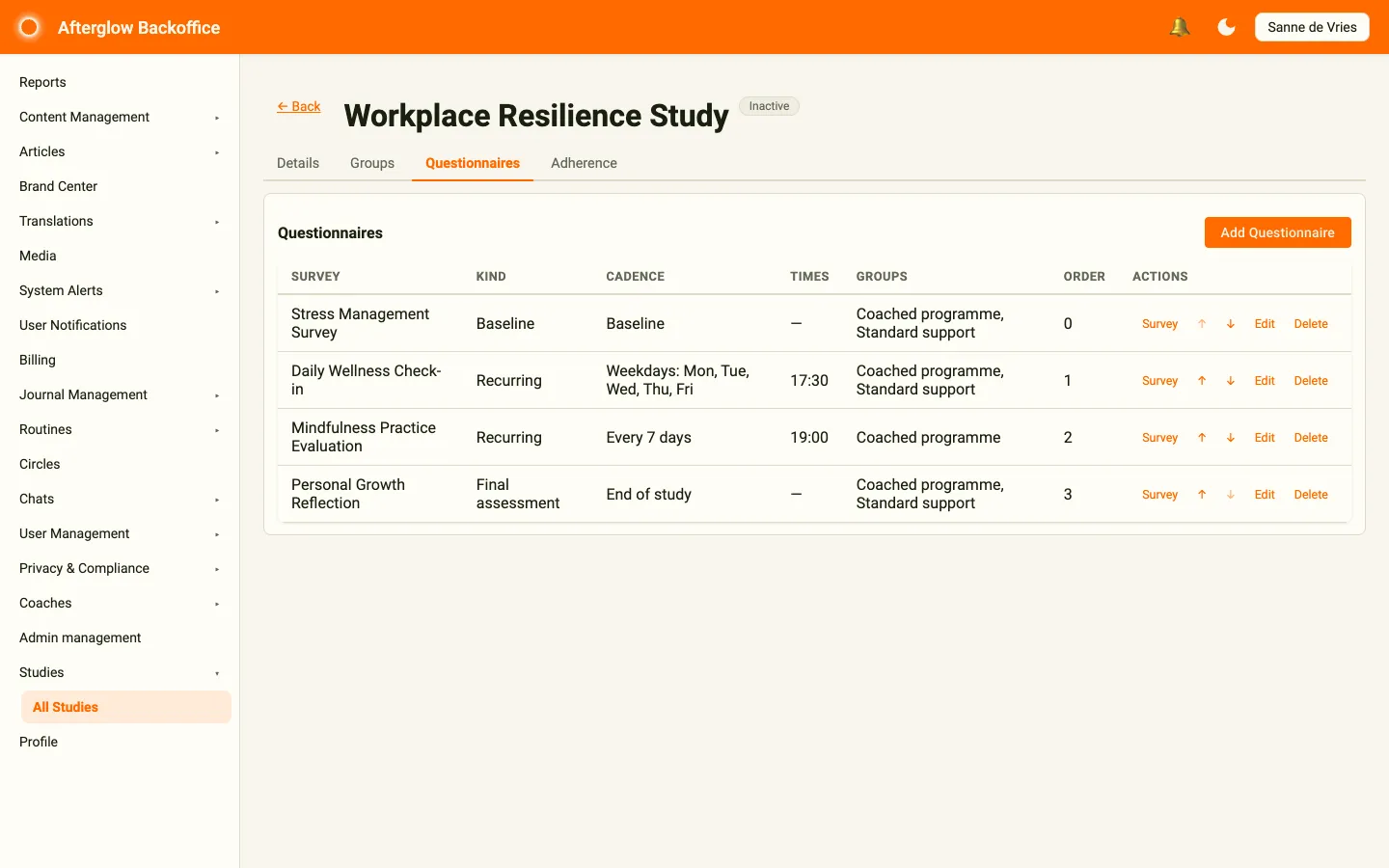
Open a study and select the Questionnaires tab to see every questionnaire linked to it. Each row shows:
- Title — The survey participants will answer, or the title of a link.
- Type — Survey for a survey answered in the app, or Link for an external link.
- Kind — Whether the questionnaire is recurring, a baseline, or a final assessment.
- Cadence — How often it repeats (for example, Daily, Weekdays: Mon, Tue or Every 3 days).
- Times — The scheduled times of day participants are prompted.
- Groups — The groups that receive this questionnaire. If none are assigned, a Not assigned — no participants warning appears because no participants will receive it.
- Order — The position the questionnaire appears in, relative to others.
- Actions — Survey (survey questionnaires only) opens the survey in a new tab so you can edit its questions; the ↑ and ↓ arrows move the questionnaire up or down; Edit and Delete change or remove it.
Use the up and down arrows to reorder questionnaires. Click Add Questionnaire in the top-right to link a new one.
Adding a questionnaire
Section titled “Adding a questionnaire”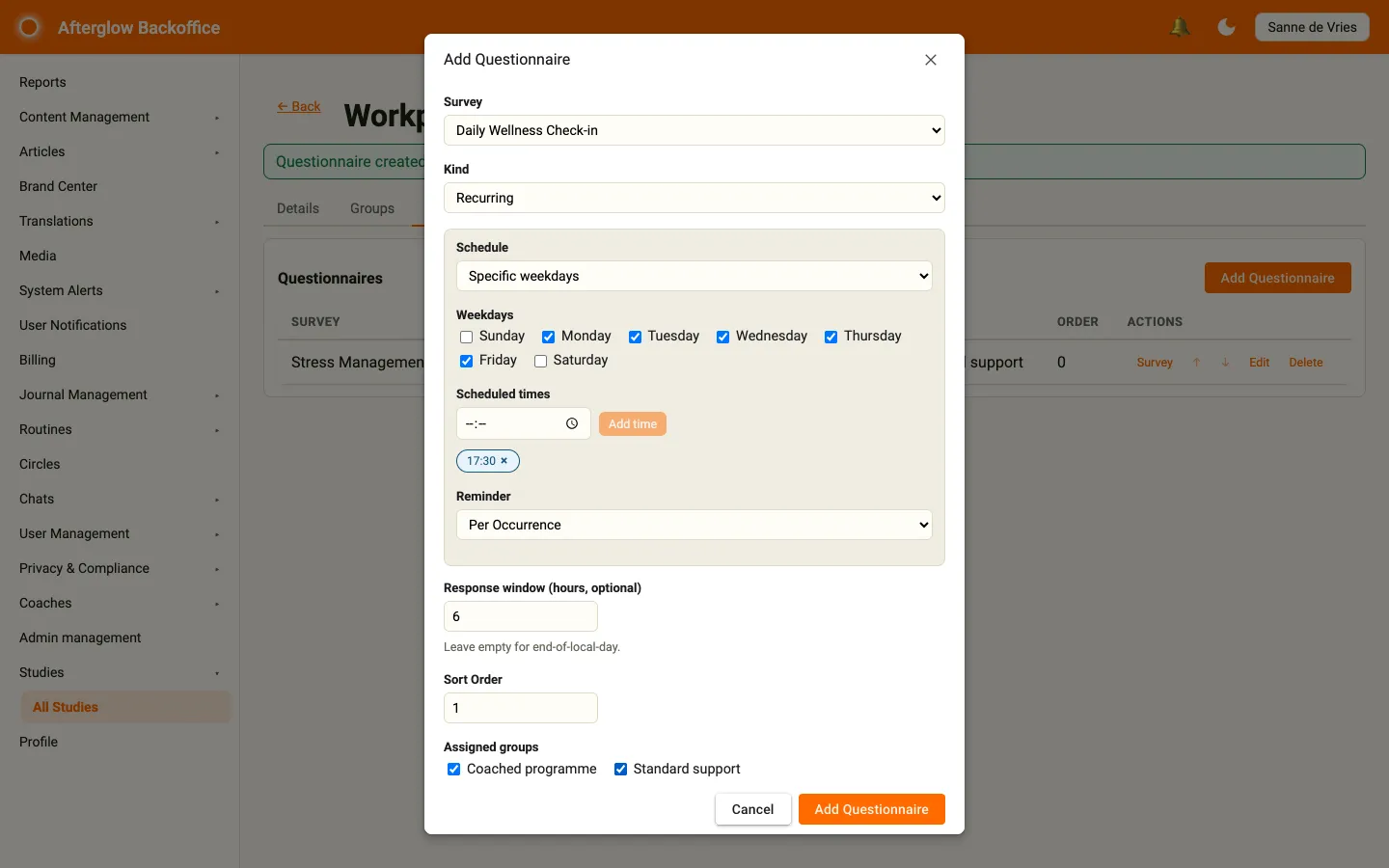
Click Add Questionnaire to open the dialog. Fill in the following fields:
- Item type — Choose Survey to have participants answer a survey in the app, or Link to send them to an external questionnaire or web page (see Link questionnaires).
- Survey — For a survey questionnaire, choose an existing survey. Its questions are managed in Content Management, not here. For a link, you fill in a Title and Link URL instead.
- Schedule — Set when and how often participants are prompted (see Schedules and cadence). The schedule also sets the questionnaire’s kind (see Questionnaire kinds).
- Response window (hours, optional) — For recurring schedules only. Optionally set how many hours participants have to answer. Leave it empty to allow answers until the end of their local day.
- Sort Order — A number that sets the questionnaire’s position in the list. Lower numbers appear first.
- Assigned groups — Tick one or more groups to receive this questionnaire.
Click Add Questionnaire to save. The button stays disabled until you have chosen a survey (or, for a link, entered a title and a valid link) and, for recurring schedules, added at least one scheduled time (and, for the weekday or interval schedules, picked at least one weekday or a valid interval).
Link questionnaires
Section titled “Link questionnaires”A link questionnaire sends participants to an external questionnaire or web page, for example one hosted by your research partner. It uses the same schedules, groups, reminders and response window as a survey questionnaire, and counts towards adherence in the same way.
- Title — The name participants see in the app. Enter it in each language your workspace uses; the dialog shows one language at a time.
- Link URL — The full web address, starting with
http://orhttps://. If you include{{USER_ID}}in the address, it is replaced by the participant’s unique study ID when they open the link, so the external questionnaire can match their answers to them without seeing their name or email. The same ID appears in the Link participant ID column of the occurrence export.
A link questionnaire counts as completed as soon as the participant taps the link in the app. Afterglow cannot see whether they finished the external questionnaire, so check completion in the external tool itself.
Questionnaire kinds
Section titled “Questionnaire kinds”You don’t choose the Kind yourself — it follows from the schedule you pick and is shown in the questionnaires list:
- Recurring — Daily, Specific weekdays, or Every X days. Repeats on its cadence throughout the study.
- Baseline — Baseline (one-shot). Delivered once, when the participant first joins the study.
- Final assessment — End of study (one-shot). Delivered once, at the end of the study.
Schedules and cadence
Section titled “Schedules and cadence”The Schedule controls the rhythm of a recurring questionnaire. Choose one of these options:
- Daily — Prompts every day.
- Specific weekdays — Prompts only on the weekdays you tick.
- Every X days — Prompts on a fixed interval you set (for example, every 3 days).
- End of study (one-shot) — A single prompt delivered at the end of the study.
- Baseline (one-shot) — A single prompt delivered when the participant joins.
For recurring schedules (Daily, Specific weekdays, and Every X days), add at least one Scheduled time for the times of day participants are prompted: pick a time and click Add time. Each time appears as a chip you can remove with its ×. Then choose a Reminder option:
- None — No reminder is sent.
- Once Daily — A single reminder per day.
- Per Occurrence — A reminder for each scheduled time.
Response window
Section titled “Response window”The Response window is how long after a scheduled time a participant can still answer. It applies to recurring questionnaires only, because it counts from a scheduled time. If you leave it empty, participants can answer until the end of their local day. Once the window closes, the prompt is recorded as missed and counts against adherence.
Locking
Section titled “Locking”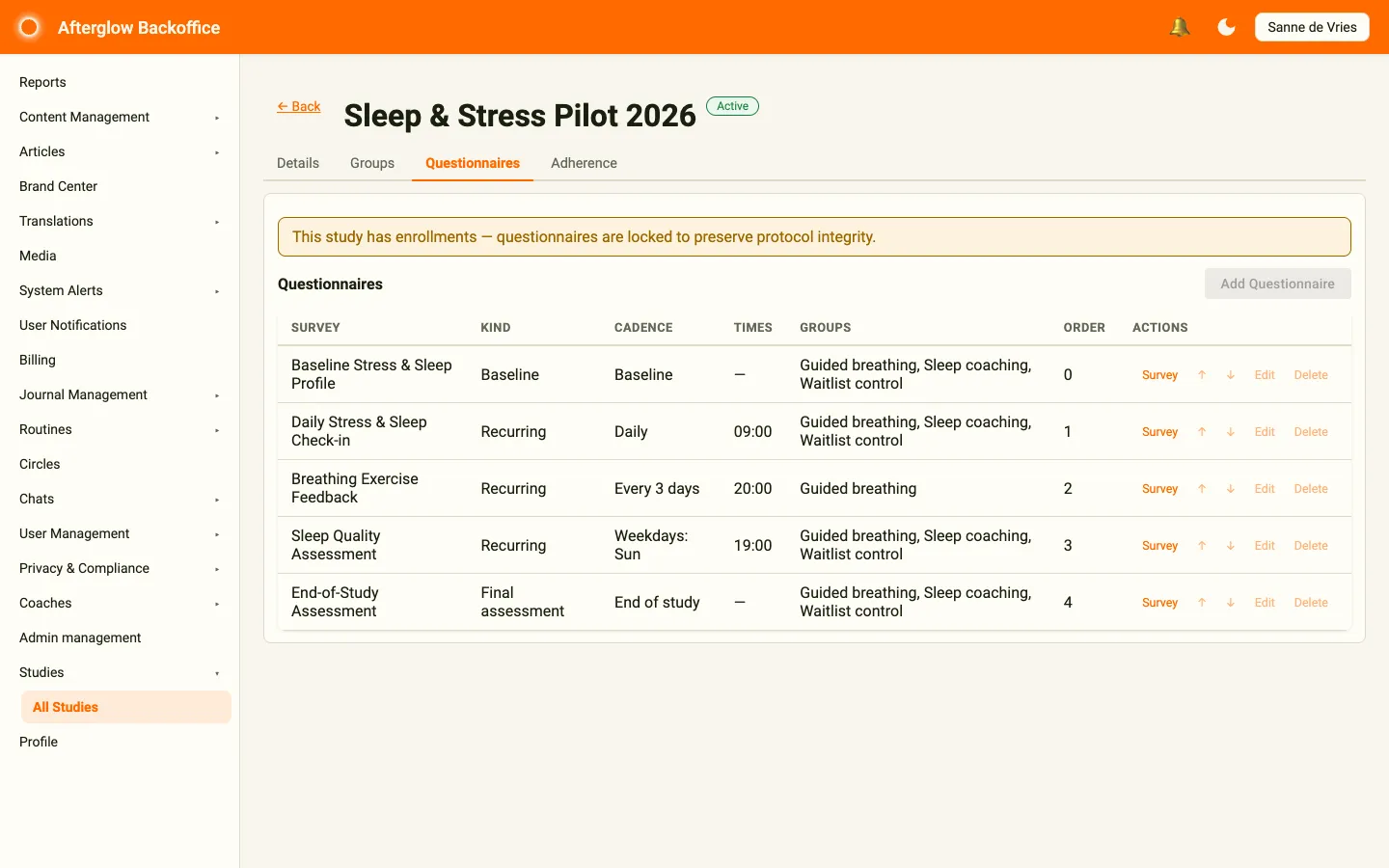
Finalize every questionnaire and group assignment before you start recruiting participants. After enrollment begins, changing the questionnaires requires creating a new study.