

Adherence and data export
The Adherence tab is a read-only dashboard that shows how completely participants answer their scheduled questionnaires, alongside a CSV export for analysis.
The dashboard helps you confirm that a study is running as intended — that prompts are reaching participants and that people are responding. For how to set up the study itself, see Studies.
The Adherence tab
Section titled “The Adherence tab”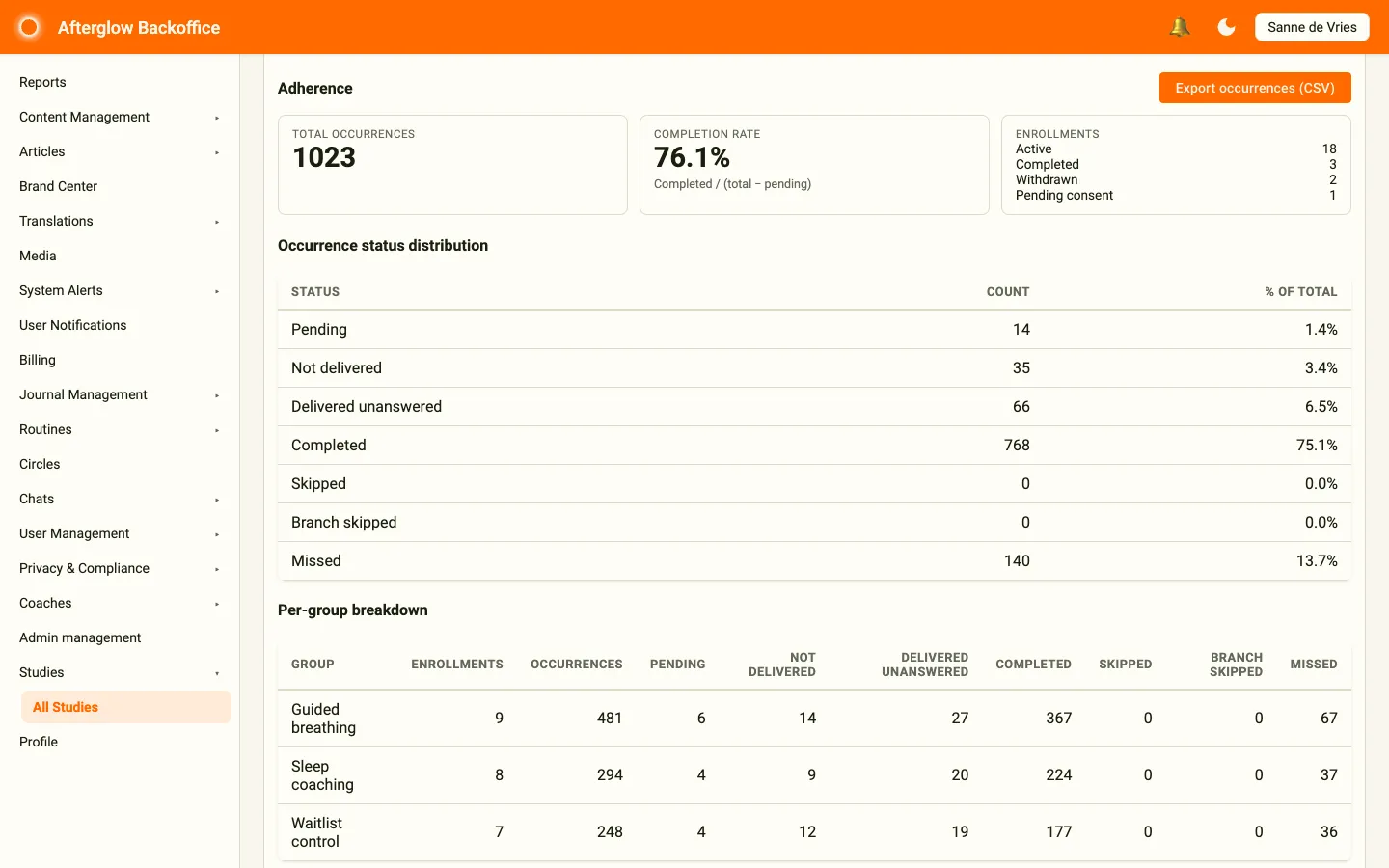
The top of the tab shows three summary cards:
- Total occurrences — Every scheduled questionnaire instance across all participants.
- Completion rate — Completed questionnaires as a percentage of those that were due (completed divided by all occurrences that are no longer pending).
- Enrollments — A breakdown of participants by status: Active, Completed, Withdrawn, and Pending consent.
Occurrence status distribution
Section titled “Occurrence status distribution”Below the summary cards, the Occurrence status distribution table lists each occurrence status with its Count and % of total. Each status describes where a single scheduled questionnaire stands:
- Pending — Scheduled, but not yet due.
- Not delivered — The prompt never reached the participant’s device.
- Delivered unanswered — The prompt reached the device but was not answered.
- Completed — The participant answered the questionnaire.
- Skipped / Branch skipped — Not required for this participant.
- Missed — The response window passed without an answer.
These distinctions matter because they separate a delivery problem from a genuine non-response. A high Not delivered count points to a device or notification issue you can fix. A high Missed count means prompts arrived but people did not respond.
Per-group breakdown
Section titled “Per-group breakdown”The Per-group breakdown table shows one row per group, with its Enrollments, total Occurrences, and a column for each status. Use it to compare arms of the study side by side and spot a group that is lagging behind.
Exporting occurrences
Section titled “Exporting occurrences”The Export occurrences (CSV) button in the top-right of the tab downloads a spreadsheet with one row per scheduled occurrence, ready to open in your analysis tool of choice.
The export is pseudonymised: each participant appears as a participant ID, never a name or email address. Each row includes:
- Participant ID and study group.
- Questionnaire and its kind.
- Scheduled date, with local and UTC times.
- Status, plus delivered, opened, and completed timestamps.
- Delivery confirmation and channel.
- Device platform and version.
- Enrollment status and start date.
- Link participant ID — the pseudonymised ID that link steps and link questionnaires share with an external study tool, so you can match that tool’s data to these rows. The ID is created the first time a participant, on an app version that supports links, opens a lesson with a Link step — or the Study area with a link questionnaire — whose web address contains
{{USER_ID}}, not when they tap the link. It is the same for that person across all studies in your organisation. It is empty for participants who have not been given one yet.
If the study has no data yet, clicking the button shows the message No occurrences to export instead of downloading a file.